Download public videos in your browser
Written by FolkCraft Studio · Updated August 17, 2026
Paste a public link from TikTok, Instagram, Facebook, X, Vimeo, VK Video, or another public video page. VidLoad lists the formats that page already offers. Click a quality when you want the file on your device. The paste box on this page needs JavaScript; the rest of this guide does not.
We built VidLoad in Morocco after desktop downloaders kept asking for installers. FolkCraft Studio runs the site. We are not a social network and we are not affiliated with TikTok, Instagram, Facebook, X, Vimeo, VK Video, or other third-party platforms. Read About for who runs the site, or use Contact Us for support and legal notices.
How it works
- Copy a public watch or post URL from the address bar.
- Paste it here and wait for a title and quality list.
- Click a format. Your browser saves the file.
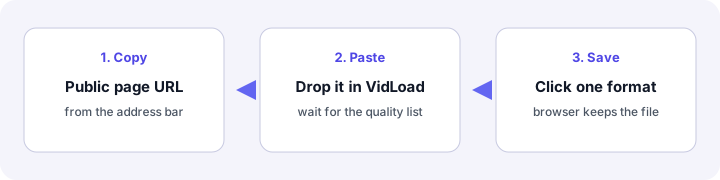
Nothing starts until you click. We do not auto-download in the background, and we do not ask you to install a desktop package. Next, see the full steps on how to use VidLoad.
A concrete example
Suppose you published a 12-minute talk on your own public page. You need the MP4 on a laptop for a room with no Wi-Fi. Open the video, copy the full address from the browser bar, paste it into the box above, wait for the title, then click 720p. Chrome puts the file on the download shelf. That is the whole product: a public URL you already have the right to keep, delivered by the browser you already use.
If the same talk were members-only or age-gated, the list would not appear. Open the URL in a private window while logged out. If the original site blocks playback there, we will not pass that wall.
On a phone, tablet, or computer
Same site, same paste box. On Android, Chrome puts the file in Downloads and usually shows a notification. On iPhone, Safari often asks you to save to Files — that is normal, not a failed download. On a computer, look at the download shelf along the bottom of Chrome or Edge, or open the browser downloads page.
Step-by-step for each device is in how to use VidLoad and the phone walkthrough.
What “public” means here
A link anyone can open without logging in. Try a private window. If the original site blocks playback there, we will not pass that wall. We do not open DRM, rentals, or members-only streams. Therefore a video that plays in your logged-in app can still fail here — our servers are guests, not your account.
Platform notes live in the supported platforms guide. Failures and what to try next: why downloads fail.
Guests, accounts, ads
Guests have a lower daily cap than signed-in users. A free account also keeps a private history of downloads you start while logged in. The remaining count shows in the product when you hit the cap. After AdSense approval, free use may show labeled ads. Ads do not sit on settings or history. See the Privacy Policy and Cookie Policy.
| Who | Daily cap | History | Ads (after approval) |
|---|---|---|---|
| Guest | Lower shared cap | None | May appear on public pages |
| Free account | Higher cap | Private, signed-in downloads only | Off on settings and history |
Rights stay with the creator
Saving a file does not make it yours to re-upload. Use this for material you have the right to keep offline. The canonical write-up is personal & lawful use. Notices go to Copyright & DMCA. Site rules are in the Terms of Service and Disclaimer.
Google’s publisher rules for advertising are documented in the AdSense program policies. How Google handles data on sites that use its services is described in How Google uses information from sites or apps that use our services.
Who operates this site
FolkCraft Studio publishes VidLoad from Morocco. Public contact is the Contact Us form (no published mailbox). Legal, privacy, and copyright messages should use the Legal reason. Product help should use Support. The About page explains what we do and do not promise.
Required reading for reviewers and regular visitors: Privacy Policy · Terms of Service · Contact Us · About.
FAQ
Is VidLoad free?
Yes. You can paste a public link without paying. Guests have a lower daily cap than signed-in users. The product shows remaining allowance when you reach it.
Which sites can I paste?
Public pages on Instagram, TikTok, Facebook, X (Twitter), Vimeo, VK Video, and other public video sites, when that page exposes formats to a logged-out visitor.
Do I install anything?
No. VidLoad is a website. The browser saves the file after you click a quality.
Can I save sound only?
When the source offers audio formats (or a conversion option), you will see audio buttons such as MP3 or WAV.
Is this legal?
You must follow copyright law and the original site’s rules. Saving a file does not give you the right to re-upload it. Read the personal-use guide if you are unsure.
Why is there a daily cap?
So the service stays up for everyone. Sign in for a higher free cap, or wait until it resets.
Where did the file go?
Your browser’s download shelf, Downloads folder, or Files app. On iPhone, Safari often asks you to save to Files first.
Do you keep a copy of the video?
No public library. Processing is for delivering a file to your device, not for hosting someone else’s catalog.
What to do next
Takeaway: if the private-window check passes, paste the address, wait for the list, and click once. Then look at the browser download UI, not the original video app. If the list never appears, read why downloads fail instead of retrying in a loop. Questions: Help or Contact Us.